Class
Classifiers, attributes, operations, associations, and inheritance.
UML · Release preview
Give every design conversation the right diagram. Model structure, explain behavior, and follow interactions with visual tools for all 14 UML diagram families.
Choose a diagram to see it in UXXU Desktop. 14 families, 14 real examples.
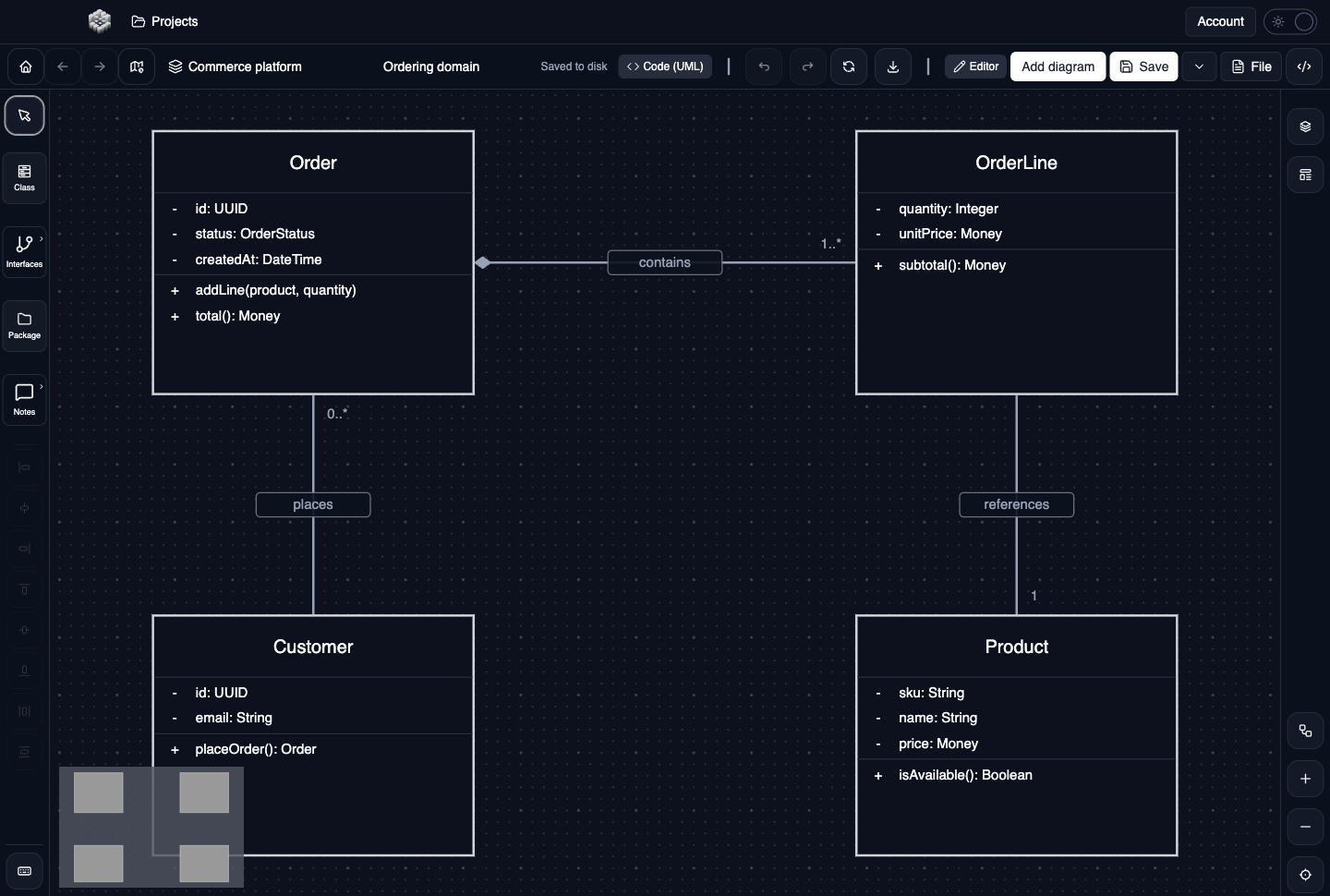
Describe an ordering domain with attributes, operations, composition, and multiplicities. Edit the notation directly on the canvas or in the element properties.
A preview of the upcoming UML release, captured in UXXU Desktop. Illustrative project; actual application screenshots.
Choose the notation that makes your design easier to understand.
Describe the parts of your system and how they fit together.
Classifiers, attributes, operations, associations, and inheritance.
Instances and their slots at a particular moment.
Components, interfaces, ports, and dependencies.
Internal parts, ports, and their connections.
Model organization, imports, and dependencies.
Nodes, execution environments, and deployed artifacts.
Stereotypes, metaclasses, and extensions.
Explain responsibilities, decisions, and changes of state.
Actions, decisions, parallel flows, and swimlanes.
States, transitions, behaviors, and connection points.
Actors, goals, system boundaries, include, and extend.
Follow conversations and behavior over time.
Lifelines, messages, activations, fragments, and gates.
Participant connections and numbered messages.
Control flow between interactions and references.
State and value timelines, observations, and constraints.
Choose a diagram family, add its elements, and connect them. Move, resize, and copy as the design evolves.
Edit labels, class members, message details, state behaviors, and more. Use editable text for advanced notation.
Undo and redo changes, save your local workspace, and reopen it for the next review. Keep local projects on your own computer.
The UML editor covers all 14 families: class, object, component, composite structure, package, deployment, profile, activity, state machine, use case, sequence, communication, interaction overview, and timing. Explore the desktop release preview above.
Use connected C4 views to explain the architecture, and UML diagrams to describe design details. C4 retains its shared architecture elements and object-to-diagram navigation. UML diagrams are visually authored; cross-diagram UML model-element references are not part of this release.
Yes. Add elements from the diagram toolbar, connect them on the canvas, and edit names, labels, and properties. Advanced notation can be expressed as editable text. Undo, redo, copying, moving, resizing, saving, and reopening support the authoring workflow.
This release focuses on visual authoring. It does not execute UML models or enforce the full UML metamodel. Architects remain in control of the meaning and correctness of their diagrams.
UXXU supports importing and exporting supported PlantUML notation. Compatibility varies by syntax and diagram type; it is not a guarantee that every PlantUML file will round-trip without changes. Review the imported diagram before relying on it.
These screenshots preview the upcoming UML release. The download page lists the currently published installers; consult the release notes for the features in each version. Local viewing is free, while local editing requires an active editing licence.
macOS, Windows, and Linux. Free local viewing; licensed local editing.