What is a UML object diagram?
A UML object diagram shows particular instances, their attribute values and their links at a specific moment. It provides a concrete snapshot of a class model.
The question this diagram answers: What does a concrete set of instances look like at one moment?
Explore all 14 UML diagram types. Interaction diagrams are a specialized subset of UML behavior diagrams.
When to use a object diagram
Use an object diagram to explain a test fixture, demonstrate a tricky association, or check a class model against concrete data. It is a snapshot rather than a definition of all possible instances.
Main elements and notation
Instance specification
An underlined name such as order42: Order identifies an instance and its classifier. An anonymous instance can omit the instance name.
Slots
Rows such as status = Paid show values for selected features. Include only values needed to understand the example.
Links
Connections show relationships between these particular instances. They are examples of relationships defined at the classifier level.
Classifier context
Use consistent classifier and feature names so readers can compare the snapshot with the class diagram.
A real example in UXXU
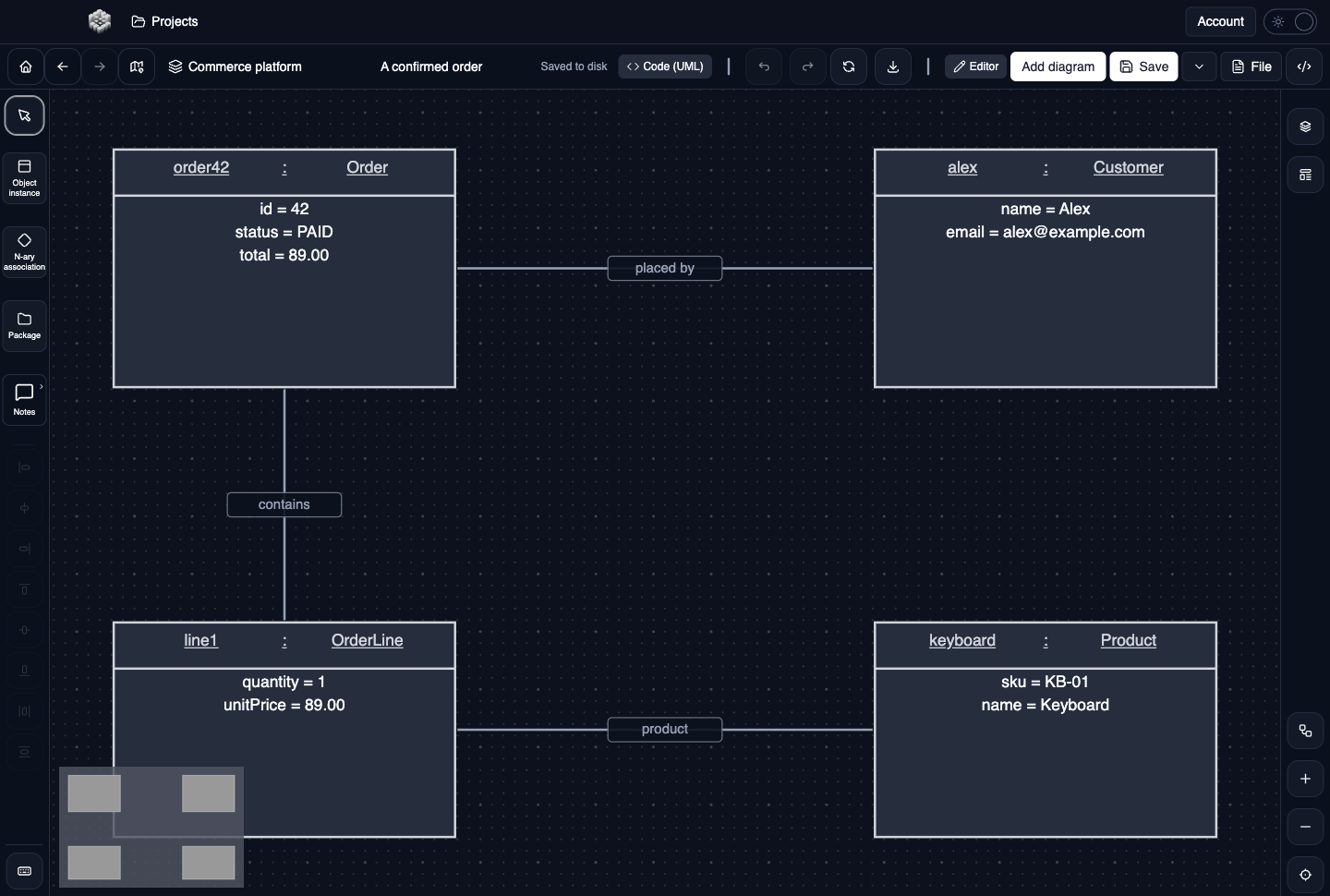
Actual UXXU Desktop screenshot of an illustrative commerce project. Open the full-size example.
The commerce snapshot shows an order, customer, line item and product with concrete values. Follow the links to identify who placed the order and which product the line describes. Unlike the class view, this example is about these instances and their current slots.
Draw it in UXXU
Open an editable project, add a Code (UML) diagram, and choose Object as its UML diagram type.
- Choose Object as the UML diagram type and add the instances needed for one snapshot.
- Set each instance name and classifier, then fill in its slot values.
- Draw object links between the actual instances represented in the snapshot.
- Add a note describing the moment being captured, such as “after payment authorization.”
Select an element or connector to edit its properties. Use editable text for advanced notation where appropriate. Move and resize elements to keep labels readable; save your workspace and reopen the diagram to review the result. Editing availability depends on your plan or desktop licence.
Common mistakes and review checks
Do not mix type definitions and instance values without making the distinction explicit. A snapshot does not show how the system got into that state.
Before sharing, check that names are consistent, connector directions are intentional, and labels do not cover the notation they describe. Ask another reader to answer the question at the top of this guide using only the diagram.
Choose the next view
UXXU focuses on visual authoring. These guides do not imply executable UML models, automatic semantic validation, or shared UML model-element references across diagrams. PlantUML import/export compatibility is separate from visual notation coverage. Check the download page for published desktop releases.
For normative UML definitions, consult the OMG UML 2.5.1 specification.