01 / Context
People and system boundaries
Show who uses your system and which external systems it depends on.
Explore this level →The architecture behind every diagram
Create every C4 view from one reusable architecture model, collaborate visually, and let AI agents explore the architecture through MCP.
400 architecture items free · No credit card required
One element. Every related view.
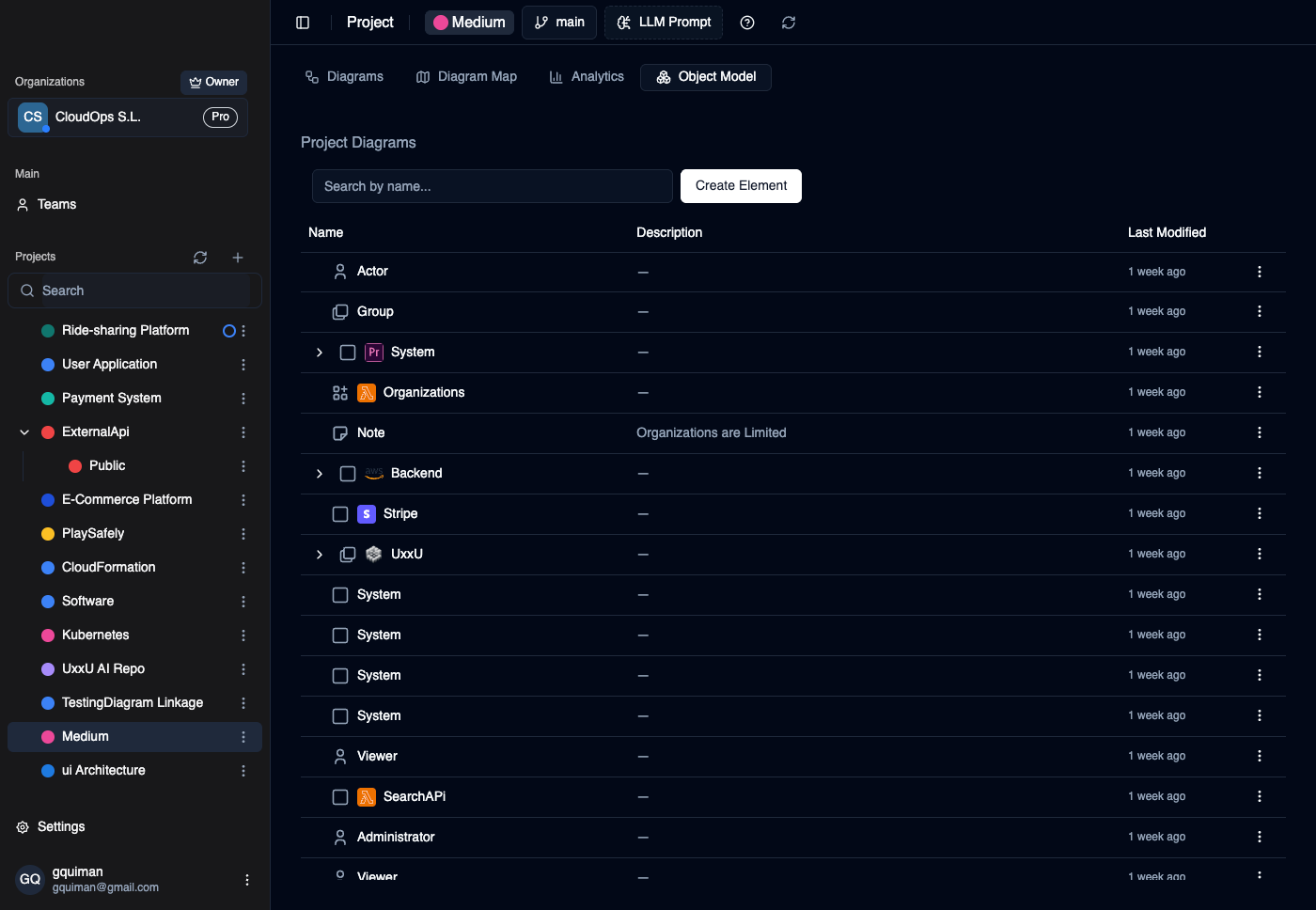
A payment provider can appear in the big picture and in a detailed checkout view. Reuse the same element so its name and description stay connected while each diagram keeps its own layout. Try a rename below.
Both views use “Payment provider” from the same model element.
This illustration runs in your browser. In UXXU, reuse an existing element in another diagram to keep its model properties connected; each view keeps its own layout.
Find and reuse the elements that already describe your system. The object model gives the team a shared place to maintain names, responsibilities and properties before selecting what each diagram shows.
The right depth for the conversation
Start with context. Add detail where it helps someone make a decision. You do not need all four levels for every system.
01 / Context
Show who uses your system and which external systems it depends on.
Explore this level →02 / Container
Connect services, applications and stores with named communication paths.
Explore this level →03 / Component
Explain the responsibilities and dependencies within a selected application.
Explore this level →04 / Code
Use class diagrams for the classes, interfaces and relationships inside a component.
Explore this level →Deployment is supplementary: show how runtime instances map to infrastructure. Explore deployment diagram examples. See the official C4 diagram definitions.
Inside the product
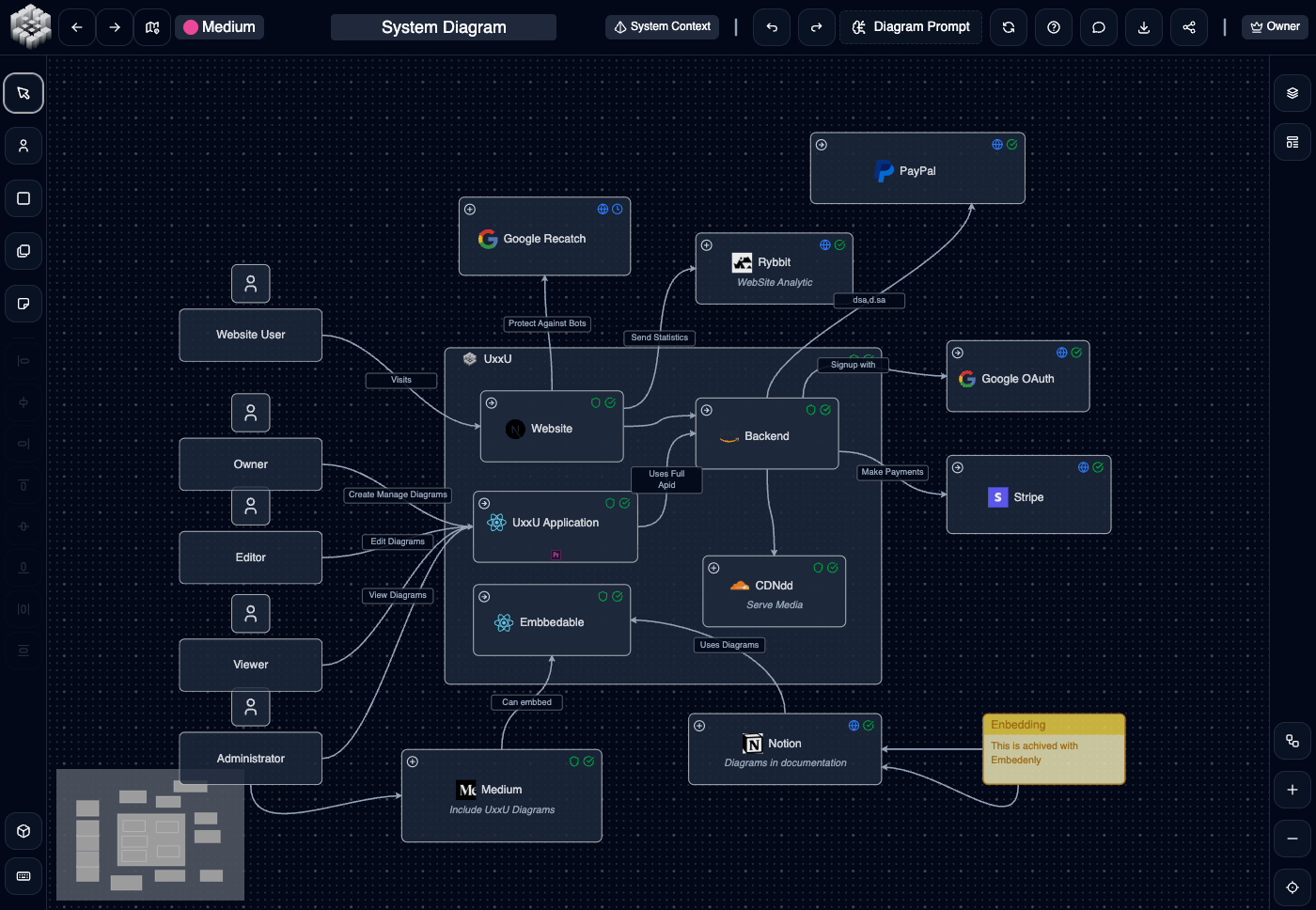
Connect a compatible MCP client to your organization. Ask it to find dependencies, explain a system boundary or propose a model update grounded in your architecture.
Connect the UXXU MCP →codeToC4 · Early access
Repository analysis is being developed to generate a starting model for review. Join the early-access waitlist; visual modeling and MCP are available independently of this workflow.
Explore codeToC4 early access →Work through a real architectural question
Follow checkout dependencies, review a ride-sharing boundary or inspect a banking system boundary. These public diagrams can be explored without registering.
Trace checkout across clients, services, owned stores, a message broker and external providers.
26 visible elements · 30 relationships
Explore this model →Review riders, drivers, dispatch and the external services around a ride-sharing system.
15 visible elements · 14 relationships
Explore this model →Review banking users, payment networks and external verification dependencies around one system boundary.
12 visible elements · 11 relationships
Explore this model →Counts verified from public diagram data on October 1, 2026. These are diagram counts, not complete workspace usage or proof of the creator’s subscription. Each example’s visible elements fit within the 400-item allowance.
Choose the workflow you will maintain
UXXU combines visual modeling, shared architecture elements and MCP access. Other tools make different tradeoffs. This comparison is written by UXXU; use the linked vendor sources and try your own model before choosing.
| Tool | Primary workflow | Consider it for | Evaluation |
|---|---|---|---|
| UXXU | Visual editing over connected architecture elements, with MCP access. | A shared architecture workspace for humans and agents. | Try the live model |
| Structurizr | DSL models with multiple views; local and server tooling. | Teams that want architecture authored as text and reviewed with code. | UXXU vs Structurizr |
| IcePanel | Collaborative visual modeling, reusable objects and message flows. | Teams that explain system behavior visually and review future designs. | UXXU vs IcePanel |
| LikeC4 | Open-source architecture DSL with interactive views and documentation embeds. | Teams that want architecture definitions in Git and custom documentation integration. | UXXU vs LikeC4 |
| Draw.io | General-purpose diagram editing with C4 shapes and templates. | Teams creating occasional diagrams alongside other visual documentation. | UXXU vs Draw.io |
| Archyl | C4 documentation with repository discovery, YAML authoring and drift checks. | Teams evaluating code-connected documentation and architecture conformance. | UXXU vs Archyl |
Vendor descriptions reviewed October 1, 2026. Feature availability and pricing may change. Use the practical C4 tool evaluation guide.
Room for a useful first model
€0
One user. Up to 400 architecture items. Unlimited projects and diagrams. No credit card required.
Start your free model →€12 / seat / month
Or €120 per seat, billed annually. Unlimited architecture items, projects and diagrams. All paid seats include the same product functionality.
See pricing and billing details →Architecture items include systems, actors, applications, containers, components, stores and groups. Diagrams are not counted as items. Paid prices exclude applicable taxes.
Yes. The free plan supports one user and up to 400 architecture items, with unlimited projects and diagrams. No credit card is required. Paid seats remove the item limit.
A model gives an element a shared identity. Reuse it across diagrams, and changes to its model properties appear wherever it is used. Each diagram remains a view with its own layout and audience.
UXXU has Context, Container, Component and Code (class diagram) views. Use only the levels your team needs. Deployment is a supplementary diagram that maps runtime instances to infrastructure; it is not the fourth C4 level.
Yes. The public models on this page support interactive exploration without an account. Create a free account when you want to save and maintain your own architecture.
Repository analysis through codeToC4 is in early access, with a waitlist. It is intended to generate a starting model for human review. You can already model visually and use the UXXU MCP to work with an existing architecture.
Yes. UXXU exposes architecture tools through an organization-scoped MCP endpoint authenticated with an API key. A compatible client can inspect and update the model within the key’s permissions. See the MCP setup guide for supported connection requirements.
Start with how your team maintains architecture. Test a shared-element rename, a cross-level review and a documentation embed. Compare visual collaboration, Git-based authoring, deployment options and the cost for your actual team size.
Each guide includes a diagram, an interactive model or a downloadable example you can use in your own review.
Learning the notation first? Visit the C4 model educational hub.