Ready to choose a tool? Explore the UXXU C4 model tool or browse interactive examples.
C4 Model Hub
Learn the C4 model with one hub, one guide, and the right next article
This page brings together the Uxxu guide and the practical C4 articles that matter most. Start with the main guide if you want the full model. Then move into the Context, Container, and Deployment articles when you need deeper examples at a specific level.
Quick Summary
What this pillar page gives you
Use this page as the shortest path through the existing C4 content on Uxxu.
- A clear starting point if you are new to the C4 model.
- Direct paths to the practical articles for Context, Container, and Deployment diagrams.
- A bridge from C4 learning into AI-assisted diagramming with Uxxu.
Start here
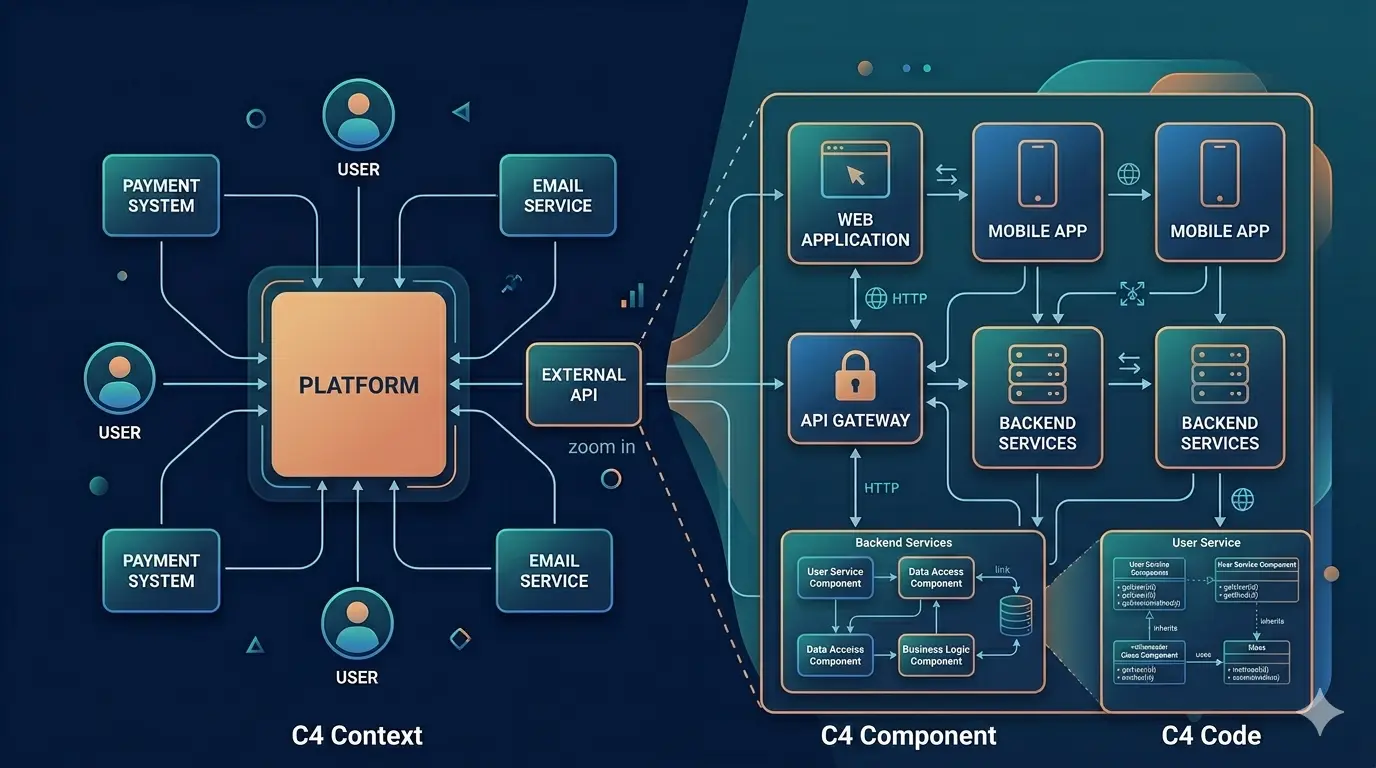
Primary guide
Guide to Understanding the C4 Model
A reference guide to understanding the C4 Model and using its levels of abstraction to communicate software architecture clearly across teams and tools.
Open the guideWatch: the C4 model explained
A 40-minute walkthrough of the C4 model by Simon Brown, its creator. Good starting point before reading the articles below.
Recommended reading order
The C4 model works best when you learn it in layers. Start broad. Then zoom in. This order follows the way most teams actually build their understanding of a system.
1. Learn the model
Start with the main guide to understand the four levels, common mistakes, and when each diagram is worth maintaining.
2. Read the reference article
Use the long-form C4 article when you want the broader rationale behind the model, diagram examples, and comparisons with UML.
3. Go level by level
Follow Context, Container, Component and Code as increasing levels of detail. Add a supplementary Deployment view for runtime infrastructure.
4. Apply it with AI
Use the LLM article when you want to teach Claude, Codex, or OpenClaw to reason with C4 and create diagrams in Uxxu.
Learn each C4 level with the right article
Each level solves a different communication problem. The best next read depends on whether you are defining boundaries, explaining major building blocks, or examining component and code detail.
Level 1
System Context
Start here when you need to explain system boundaries, external dependencies, and the people who interact with the system.
Read the Context guide
Level 2
Container
Use this level to show the main applications, APIs, databases, workers, and communication paths inside the system.
Read the Container guide
Level 3
Component
Use this level only where internal complexity needs it. The main guide explains when component diagrams help and when they become noise.
Go to the Component section
Level 4
Code
Use code diagrams to zoom into a single component and show its implementation — class structures, entities, and relationships — ideally generated from tooling.
Read the Code diagram guide
Beyond the four levels: supplementary diagram types
The C4 model also defines diagram types that sit outside the numbered levels. The System Landscape gives a portfolio view across multiple systems, the Dynamic diagram shows runtime behaviour for any level, and the Deployment diagram maps containers to infrastructure.
Supplementary
System Landscape
Use this diagram to show the full portfolio of software systems in an enterprise and the relationships between them — the view above Level 1.
Read the System Landscape guide
Supplementary
Dynamic
Use dynamic diagrams to show how elements from a static C4 diagram collaborate at runtime for a specific scenario, flow, or use case.
Read the Dynamic diagram guide
Supplementary
Deployment
Use deployment diagrams to show regions, clusters, managed services, replicas, failover boundaries, and runtime topology.
Read the Deployment guide
Supporting articles in this cluster
These pages already exist on Uxxu. The pillar brings them together so readers, search engines, and AI systems can move through the topic in a structured way instead of landing on isolated articles.
2025-08-17
What is the C4 Model? A complete guide to C4 architecture
Learn what the C4 model is, how its four diagram levels work (Context, Container, Component, Code), and when to use each. The complete reference guide with examples.
2025-03-10
The Practical Guide to C4 Context Diagrams
A hands-on, example-driven guide to creating effective System Context Diagrams using the C4 Model with real-world case studies across industries.
2025-03-02
The Practical Guide to C4 Container Diagrams
A hands-on guide to C4 container diagrams that clarifies applications, services, databases, and communication paths in real software systems.
2025-08-17
C4 Deployment Diagram: A practical guide with real-world examples
Learn what a C4 deployment diagram is, how to draw one, and see real deployment view examples across AWS, GCP, Kubernetes, multi-region, and HIPAA environments.
2026-04-16
How to Teach Your LLM to Write C4 Diagrams
How to teach an LLM to reason with C4 diagrams using a skill-plus-MCP workflow, with Uxxu as the practical architecture modeling demo.
Use C4 with AI
Once you understand the model, the next step is to teach your LLM to reason with the same hierarchy. That is where the Uxxu MCP and the C4 skill workflow fit in.
- Use the guide and practical articles to teach the model the hierarchy.
- Use the Uxxu MCP so the model can create or update real diagrams.
- Use the LLM article when you want the full skill-plus-MCP workflow.