Version your architecture
UxxU brings branch-based versioning to the architecture model without replacing the way your team works. Projects continue to save automatically while architects explore changes on isolated branches. Teams can see how branches are related, switch between versions, and merge approved diagrams and model elements back into the shared architecture.
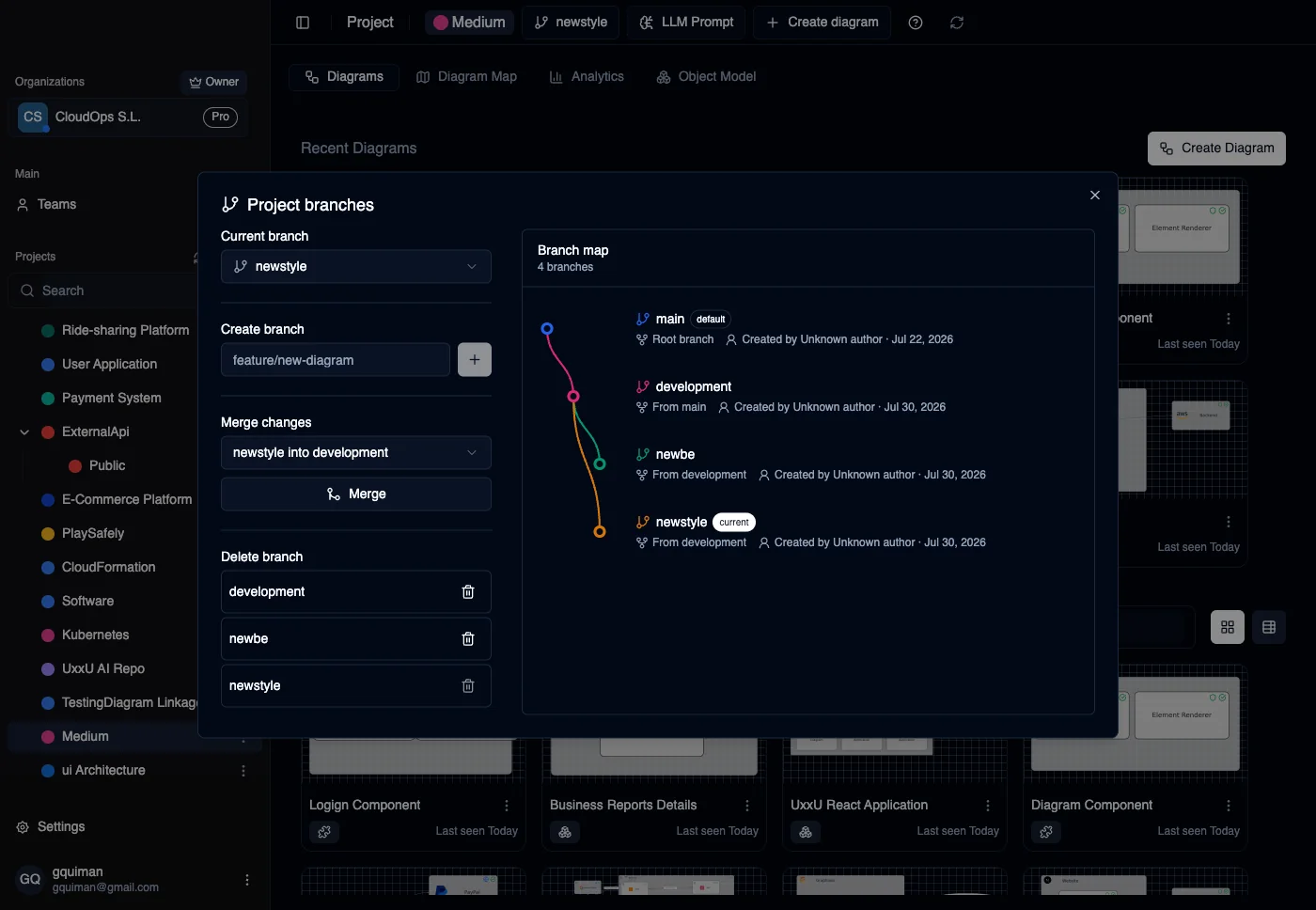
Architecture Versioning
A Main Branch for Every Project Every project starts with a clear default branch that represents the current shared architecture.
Explore Changes Safely Create a branch for a redesign, migration, new integration, or experimental boundary without interrupting work on the main architecture.
Visible Branch Lineage The branch map shows where each branch came from, who created it, and which branch is currently active.
Automatic Saving UxxU keeps saving as the team works. Branching adds controlled alternatives without introducing a manual commit workflow.
Merge Approved Architecture Merge diagrams and model elements from one branch into another when a change is ready to become part of the shared model.
Remove Obsolete Branches Delete branches that are no longer needed while keeping the main project history and structure clear.
Why Architecture Versioning Matters
Architecture changes often need review before they become the new source of truth. UxxU gives teams space to explore alternatives while preserving a clear, navigable architecture for everyone else.
Get started with Uxxu
Uxxu is a collaborative software architecture platform built around the C4 model. Teams use Uxxu to design, document, analyze, and evolve complex systems. Move beyond static architecture diagrams with connected views, dependency intelligence, technology lifecycle management, and real-time collaboration.
Start modeling your architecture today. Organize systems into projects, create C4 diagrams at multiple levels of detail, connect diagrams together, and explore architecture insights that help your team understand complexity and manage technical debt.
Frequently Asked Questions
What is the C4 model?
The C4 model is a lightweight approach to software architecture documentation created by Simon Brown. It describes architecture using four levels of diagrams: Context, Container, Component, and Code. Each level provides a different level of detail, allowing teams to communicate architecture clearly to different audiences. Uxxu is built around the C4 model and supports Context, Container, and Component diagrams out of the box.
How does Uxxu differ from traditional diagram tools?
Traditional diagram tools like Draw.io, Lucidchart, or Miro treat architecture diagrams as collections of shapes and arrows. Uxxu treats architecture as a structured model. Architecture elements such as systems, actors, applications, containers, components, and stores are defined once and reused across multiple diagrams. This means diagrams stay consistent, relationships are tracked, and the architecture can be analyzed to produce insights about complexity, dependencies, and technology usage.
Can multiple teams collaborate on the same architecture in Uxxu?
Yes. Uxxu is designed for team collaboration. Organizations can invite collaborators as Viewers, Editors, or Administrators. Multiple users can work on diagrams and architecture elements simultaneously. Architecture is organized into organizations, projects, and subprojects so different teams can manage their own sections while still contributing to a shared organizational architecture model. This makes Uxxu suitable for both small engineering teams and large organizations managing multiple products and domains.
How does Uxxu handle large and complex architectures?
Uxxu is built to scale with architecture complexity. Large systems can be broken down into organizations, projects, and subprojects. Diagrams are connected together so teams can navigate from a high-level system context down to detailed container and component views. Architecture elements are shared across related projects to maintain consistency. Built-in analytics provide metrics such as architecture size, diagram density, and dependency concentration to help teams understand how their architecture is growing and where complexity is accumulating.
What is technology lifecycle management in Uxxu?
Technology lifecycle management in Uxxu allows teams to tag architecture elements with the technologies they use and assign each technology a lifecycle status: Future, Production, Deprecated, or Removed. This makes it possible to track which technologies are actively used, which are being phased out, and which are planned for future adoption. Teams can then generate reports showing the distribution of technology lifecycle stages across the entire architecture, helping them prioritize modernization efforts and manage technical debt proactively.
Is there a free plan available?
Yes. Every organization in Uxxu includes a free plan for one user with up to 400 architecture items. Architecture items include systems, actors, applications, containers, components, stores, and groups; diagrams are not counted toward the limit. Paid seats remove the item limit, and every paid seat includes the same complete product access.
Free for 1 user and up to 400 items · No credit card required