A C4 Component diagram looks inside one container. It is useful when a team needs to agree on internal responsibilities, dependency direction or the boundary to an external service. It should not quietly turn every class into an architectural component.
Work through the checkout API
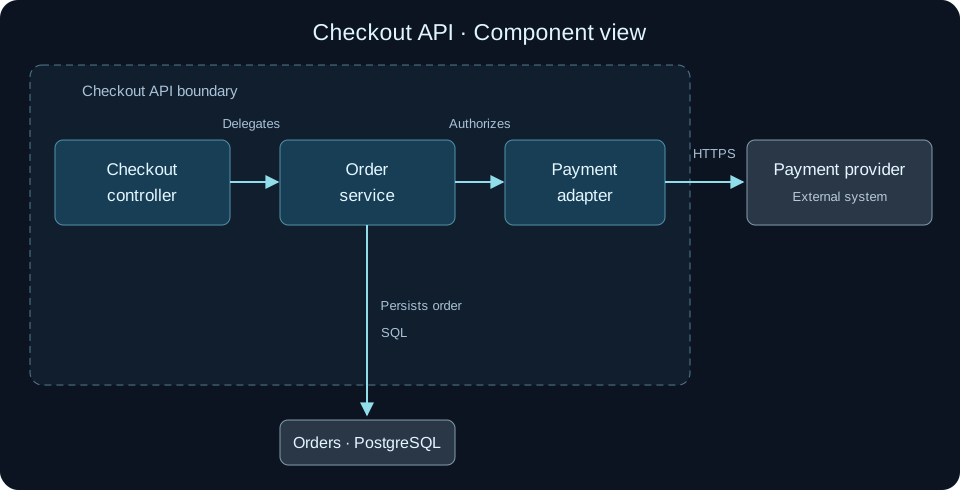
The example has three responsibilities. The Checkout controller handles the incoming request. The Order service coordinates order creation. The Payment adapter translates the external provider’s contract. The order store and provider remain dependencies outside this container’s internal component boundary.
Download the complete checkout DSL. Open its Components view to inspect these relationships in the context of the container and system views. The file is a portable teaching example; it is not a direct UXXU import.
Decide what deserves a component
Treat a component as a meaningful grouping of functionality with an interface. A controller, orchestration service and provider adapter can make useful components in this example. Five helper functions called by the adapter usually do not.
Check the design against the code. If the controller directly calls the provider today, draw that dependency or label the alternative as proposed. A tidy future architecture presented as current reality makes reviews misleading.
Run a change-impact review
Imagine the payment provider changes its authorization API. Which component owns the translation? Which interfaces and tests must be reviewed? Does the order service depend on a provider-specific response or on an application-level contract?
Use the diagram to list those dependencies before making the code change. If the discussion reaches classes, methods and interfaces, add a focused Code view. Do not overload the component diagram with every signature.
Keep it connected to its parent
In UXXU, build the component view for the relevant application and reuse existing architecture elements when they refer to the same entity. Keep the parent container view available for reviewers who need to re-establish the boundary. The C4 model tool explains how connected elements keep views consistent.
The official C4 component guidance defines this level. For deeper detail, use the Code diagram guide and the C4 versus UML example.