What is a UML sequence diagram?
A UML sequence diagram shows participants and the messages exchanged during an interaction, with occurrences ordered along lifelines. It explains a particular conversation or scenario.
The question this diagram answers: Who sends which messages during a particular scenario?
Explore all 14 UML diagram types. Interaction diagrams are a specialized subset of UML behavior diagrams.
When to use a sequence diagram
Use a sequence diagram to review a request, integration protocol or failure scenario. It emphasizes interactions between participants. Read occurrence order down each lifeline; vertical placement is not a measured time scale unless timing information is explicitly supplied.
Main elements and notation
Lifeline
A participant header and its lifeline identify a role in the interaction. Keep participants at a consistent level of detail.
Message
Arrows distinguish synchronous calls, asynchronous communication, replies, creation and destruction. Choose the connector kind that matches the intended interaction.
Execution specification
An activation bar marks an execution interval on a lifeline. It is not automatically a measure of CPU usage.
Combined fragment
Frames such as alt, opt, loop and par organize alternatives, optional behavior, repetition and concurrency. Guards explain operand conditions.
Gates and continuations
Gates connect messages across an interaction boundary. Continuations label continuation points across interaction fragments.
Invariants and ordering
State invariants constrain a point in an interaction. General ordering relates occurrences; observations and constraints express time or duration details.
A real example in UXXU
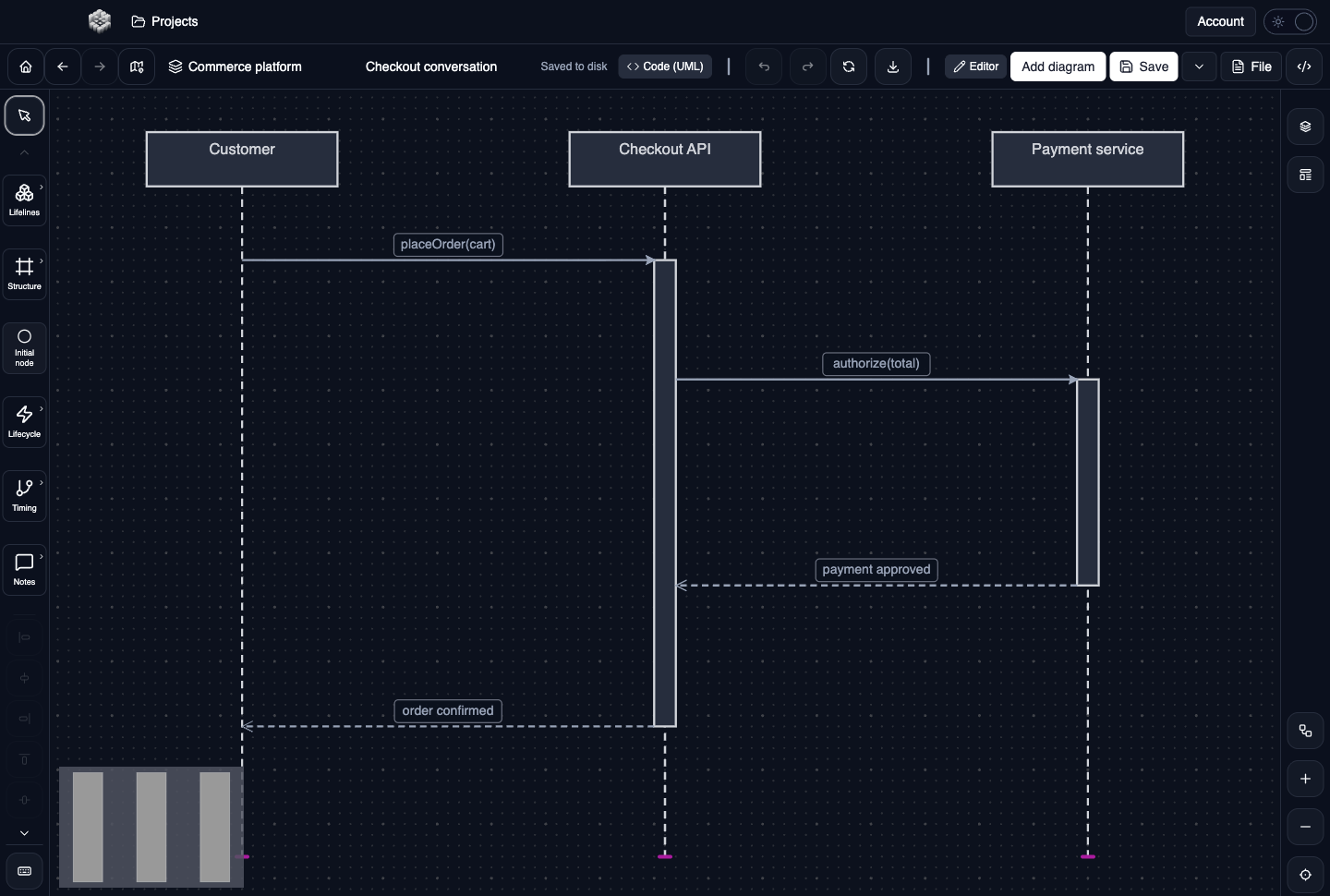
Actual UXXU Desktop screenshot of an illustrative commerce project. Open the full-size example.
The checkout example follows the customer, API and payment service. Start with the initiating message, trace the calls and replies, and compare their rows with the activation bars. The drawing provides a conversation to review rather than evidence that the implementation follows it.
Draw it in UXXU
Open an editable project, add a Code (UML) diagram, and choose Sequence as its UML diagram type.
- Add the participants and arrange their lifelines left to right.
- Draw each message to the intended row on a lifeline or activation, then choose its message kind.
- Add and size activations where execution intervals matter.
- Use fragments, guards, gates or observation annotations to clarify the scenario; review message endpoints after moving elements.
Select an element or connector to edit its properties. Use editable text for advanced notation where appropriate. Move and resize elements to keep labels readable; save your workspace and reopen the diagram to review the result. Editing availability depends on your plan or desktop licence.
Common mistakes and review checks
Do not infer a strict global timeline from unrelated occurrences on different lifelines. Use explicit ordering where needed, and use a timing diagram when quantitative time is the main question.
Before sharing, check that names are consistent, connector directions are intentional, and labels do not cover the notation they describe. Ask another reader to answer the question at the top of this guide using only the diagram.
Choose the next view
UXXU focuses on visual authoring. These guides do not imply executable UML models, automatic semantic validation, or shared UML model-element references across diagrams. PlantUML import/export compatibility is separate from visual notation coverage. Check the download page for published desktop releases.
For normative UML definitions, consult the OMG UML 2.5.1 specification.