What is a UML communication diagram?
A UML communication diagram shows collaborating participants, their links and numbered messages. It emphasizes the structure of a collaboration while recording message order.
The question this diagram answers: Which participants collaborate, and what messages travel over their connections?
Explore all 14 UML diagram types. Interaction diagrams are a specialized subset of UML behavior diagrams.
When to use a communication diagram
Use a communication diagram when the collaboration structure matters more than a vertical timeline. It describes an interaction through connected participants and numbered messages.
Main elements and notation
Participant
Objects or roles identify the collaborators in the interaction. Names and classifiers give the context for each role.
Link
A connection shows a communication route between participants.
Numbered message
Sequence expressions such as 1, 1.1 and 1.2 communicate ordering and nesting. The message arrow identifies sender and receiver.
Guards and iteration
Additional message text can describe conditions or repeated communication. Keep the notation consistent across the diagram.
A real example in UXXU
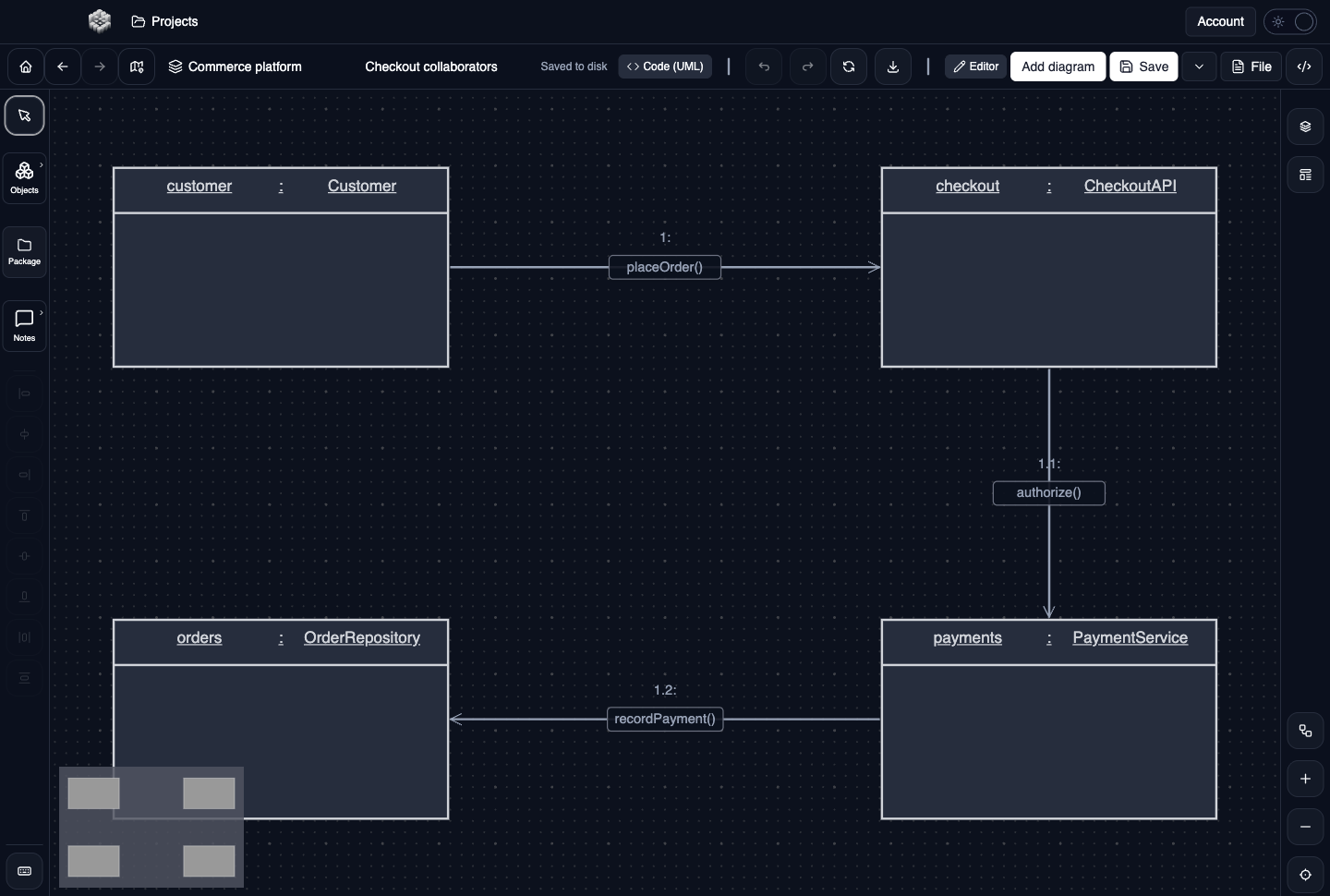
Actual UXXU Desktop screenshot of an illustrative commerce project. Open the full-size example.
The checkout collaborators communicate through numbered messages. Begin with message 1, then follow the numbering rather than the physical position of the boxes. Use the layout to see which participants communicate directly and where coordination is concentrated.
Draw it in UXXU
Open an editable project, add a Code (UML) diagram, and choose Communication as its UML diagram type.
- Add the participants for one interaction and arrange them to keep links readable.
- Connect participants that exchange messages.
- Add numbered messages with clear direction and meaningful labels.
- Review the numbering after inserting or moving messages; positioning alone does not establish their order.
Select an element or connector to edit its properties. Use editable text for advanced notation where appropriate. Move and resize elements to keep labels readable; save your workspace and reopen the diagram to review the result. Editing availability depends on your plan or desktop licence.
Common mistakes and review checks
Do not confuse a numbered message with a static dependency. If nested calls or parallel fragments become difficult to follow, a sequence diagram may communicate the same scenario more clearly.
Before sharing, check that names are consistent, connector directions are intentional, and labels do not cover the notation they describe. Ask another reader to answer the question at the top of this guide using only the diagram.
Choose the next view
UXXU focuses on visual authoring. These guides do not imply executable UML models, automatic semantic validation, or shared UML model-element references across diagrams. PlantUML import/export compatibility is separate from visual notation coverage. Check the download page for published desktop releases.
For normative UML definitions, consult the OMG UML 2.5.1 specification.