What is a UML class diagram?
A UML class diagram describes the types in a system, their attributes and operations, and structural relationships such as associations, composition and generalization.
The question this diagram answers: What concepts exist in the domain, and how are they related?
Explore all 14 UML diagram types. Interaction diagrams are a specialized subset of UML behavior diagrams.
When to use a class diagram
Use a class diagram to agree on a domain vocabulary, review responsibilities, or describe a software API. It describes types rather than the values of a particular running object. Start with the concepts relevant to one design decision; a diagram of every class is usually harder to review.
Main elements and notation
Class compartments
The name identifies the classifier. Attribute and operation compartments describe its data and behavior. For example, quantity: Integer is an attribute and subtotal(): Money is an operation.
Visibility
The prefixes +, -, # and ~ conventionally mean public, private, protected and package visibility.
Associations and multiplicity
A solid line relates classifiers. Read the number at an end as how many instances at that end may relate to one instance at the opposite end: 1, 0..1, * or 1..*.
Composition and aggregation
A filled diamond marks the composite whole; a hollow diamond marks shared aggregation. Use composition only when the ownership and lifetime semantics fit your design.
Generalization and realization
A solid line with a hollow triangle points to a more general classifier. A dashed realization line points to the contract being implemented.
Advanced details
Association classes, qualifiers, templates and constraints add precision when the design needs it. Keep explanatory text close to the relevant classifier or association.
A real example in UXXU
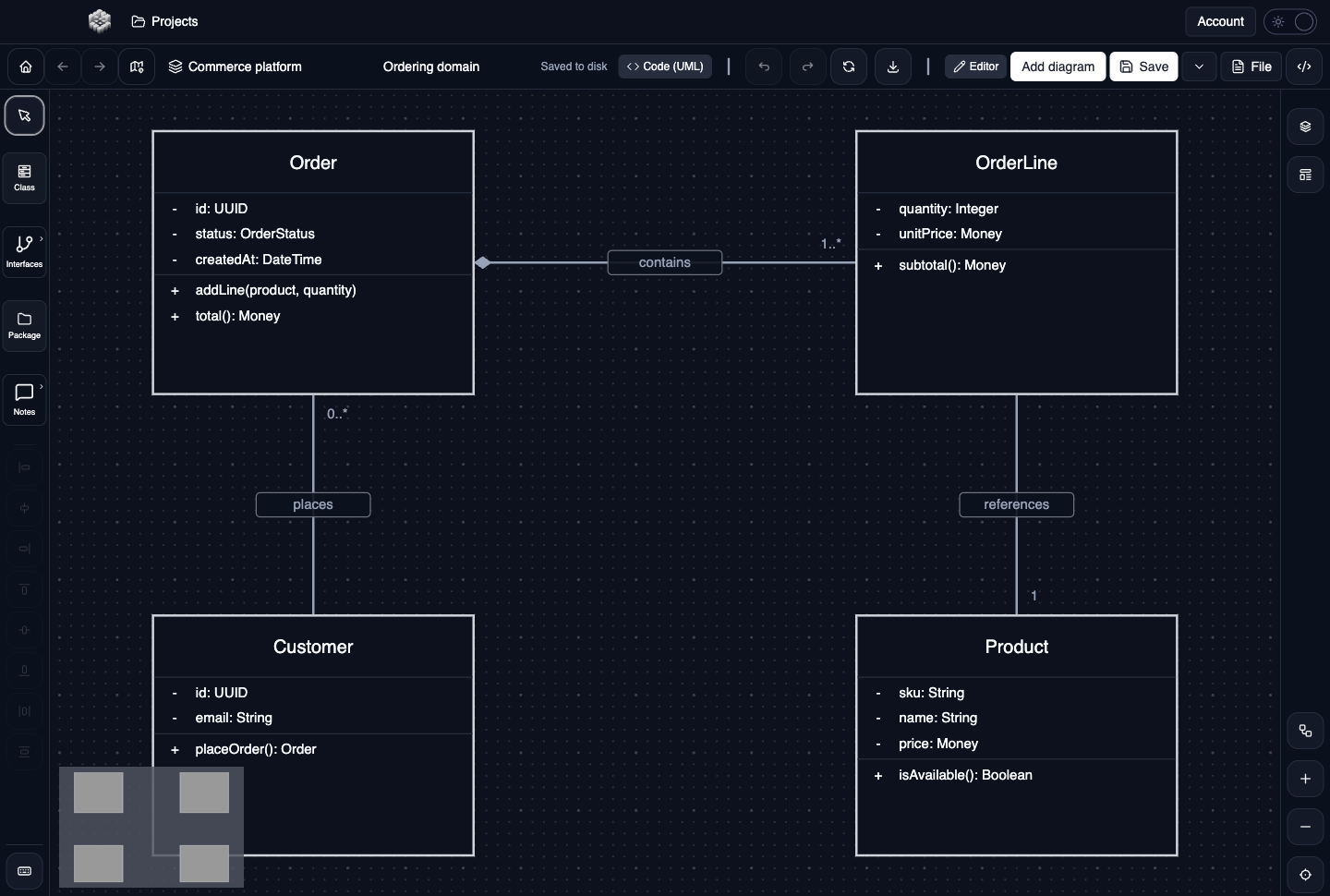
Actual UXXU Desktop screenshot of an illustrative commerce project. Open the full-size example.
The ordering example places Order and OrderLine at the top, with Customer and Product below. Order contains line items, a customer places orders, and each line references a product. Read the 1..* at the OrderLine end as one or more lines for an order, then inspect the member compartments to see where quantity, price and total belong.
Draw it in UXXU
Open an editable project, add a Code (UML) diagram, and choose Class as its UML diagram type.
- Add Order, OrderLine, Customer and Product with the Class tool.
- Select each classifier and edit its name, attributes and operations in the properties editor.
- Connect the classes with associations; choose composition for the relationship whose whole is Order.
- Edit relationship roles and multiplicities, then check that diamonds and arrowheads are at the intended ends.
Select an element or connector to edit its properties. Use editable text for advanced notation where appropriate. Move and resize elements to keep labels readable; save your workspace and reopen the diagram to review the result. Editing availability depends on your plan or desktop licence.
Common mistakes and review checks
Do not use an inheritance arrow to mean “calls” or “contains.” A class diagram describes structure; use a sequence diagram to explain an individual call flow.
Before sharing, check that names are consistent, connector directions are intentional, and labels do not cover the notation they describe. Ask another reader to answer the question at the top of this guide using only the diagram.
Choose the next view
UXXU focuses on visual authoring. These guides do not imply executable UML models, automatic semantic validation, or shared UML model-element references across diagrams. PlantUML import/export compatibility is separate from visual notation coverage. Check the download page for published desktop releases.
For normative UML definitions, consult the OMG UML 2.5.1 specification.